Compare players
Put candidates side by side and read their statistics in context.
Basics 2 of 34 steps
Compare players who could do the same job, then check what explains the difference. Begin with two candidates and one question, such as which forward combines goal threat with regular involvement.
1. Add your players
Open Premier League player comparison and choose Add player. Search for a player and select them, then add your second candidate. Press Done to close the picker and show the comparison.
You can add up to five players. Start with two or three so that the differences remain easy to follow. Remove a selected player when you want to try another candidate.
If you already have a shortlist in the player table, select the controls beside the players' ranks. Choose at least two, then press Compare in the selection bar. Players from the same league open that league's comparison.
2. Check the context before the numbers
Check each player's identity, position and season before reading the comparison. For your first pass, use players from the same league and season who play a similar role.
A Mixed positions notice means that some measures will be harder to compare directly. A full-back and a forward can both contribute in attack, but a higher attacking figure alone does not show who performs their own role better.
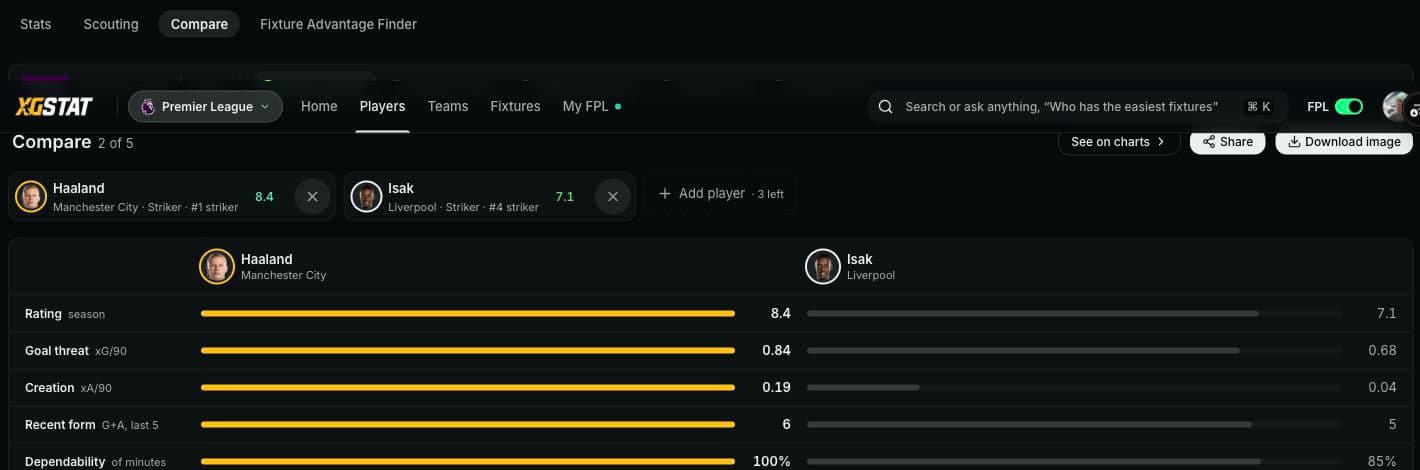
Example screen from 26 October 2026. Figures change as matches are played.
Minutes matter too. A strong rate from brief involvement asks a different question from a similar rate sustained across regular starts. Check the amount of football behind the figure before making a choice.
3. Read each row on its own terms
Read the unit beside a category before deciding who leads. Season rating, a per-90 figure and recent form describe different things. A lead in one row does not settle the whole comparison.
For the forward example, check the available goal-threat and creation rows, then look at involvement. You may find a trade-off worth investigating: one candidate could offer more in one area while another plays more regularly. Let the displayed data establish whether that trade-off exists.
Use per-90 statistics for help reading rates and the player rating guide for the rating's meaning. Where a profile uses percentiles, percentile rankings explains the comparison group.
Locked Pro categories are not evidence for either player. Missing data is also a reason to leave a question open, rather than to assume a player has done nothing.
4. Investigate the difference
Choose See on charts to carry the selected players into the charts. Use this when a headline difference needs more context, or open a player's page to inspect their record in more detail.
Write down the next question your comparison creates. For example: does the player with the stronger attacking rate also have enough minutes to make that rate useful? That gives you something specific to check next.
Open player comparison to test your candidates. To find a wider set of players first, follow Build a player shortlist.